Playbook
Staffing and Recruiting Playbook
Text messaging helps staffing agencies and recruiters lock in quality job candidates, fill temp positions, and successfully onboard new employees.
In this staffing and recruiting playbook, you’ll find tips, best practices, and step-by-step instructions for:
Staffing agencies trying to fill jobs ASAP
Recruiting firms trying to find top talent
Internal HR teams working to hire and onboard new employees
Our advice below can apply to teams of all sizes, but we do have small to mid-sized ones in mind.

5 SMS Tools to Help Staffing Agencies Hire Faster
1. Capture and convert website traffic with SMS Chat.
You put a ton of effort into driving traffic to your website. SMS Chat is a widget that job candidates can use to start text conversations about finding new roles, or businesses can use it to ask about your rates.
Your website visitors can use SMS Chat to do things like:
Schedule a call
Fill out an application form
Reach out with initial questions
The faster candidates can get in touch with you, the more likely you are to win them over a competitor.

2. Promote new job openings with keywords.
Your recruiting or staffing agency is only as good as the job candidates in your contact lists. It’s also helpful for internal HR teams whenever new roles open up. So how do you consistently add potential job candidates to your contact list?
Promote keywords that people can text message you to receive updates about new roles. You can advertise these keywords on your website, ads, social media, and more with a message like:
“Text JOB to start looking at opportunities with one of our recruiters today!”
Or.
“Text WORK to receive updates whenever new roles at [business name] open up.”
Or even.
“Text TEMP to get alerts whenever new positions are available.”
People who’ve opted in to receive these updates will be added to keyword groups that you can text again and again as needed.

3. Boost your visibility with review requests via text.
Candidates and clients both rely on reviews before deciding to work with you. Gathering reviews ongoing is a must if you’re going to draw in new manpower.
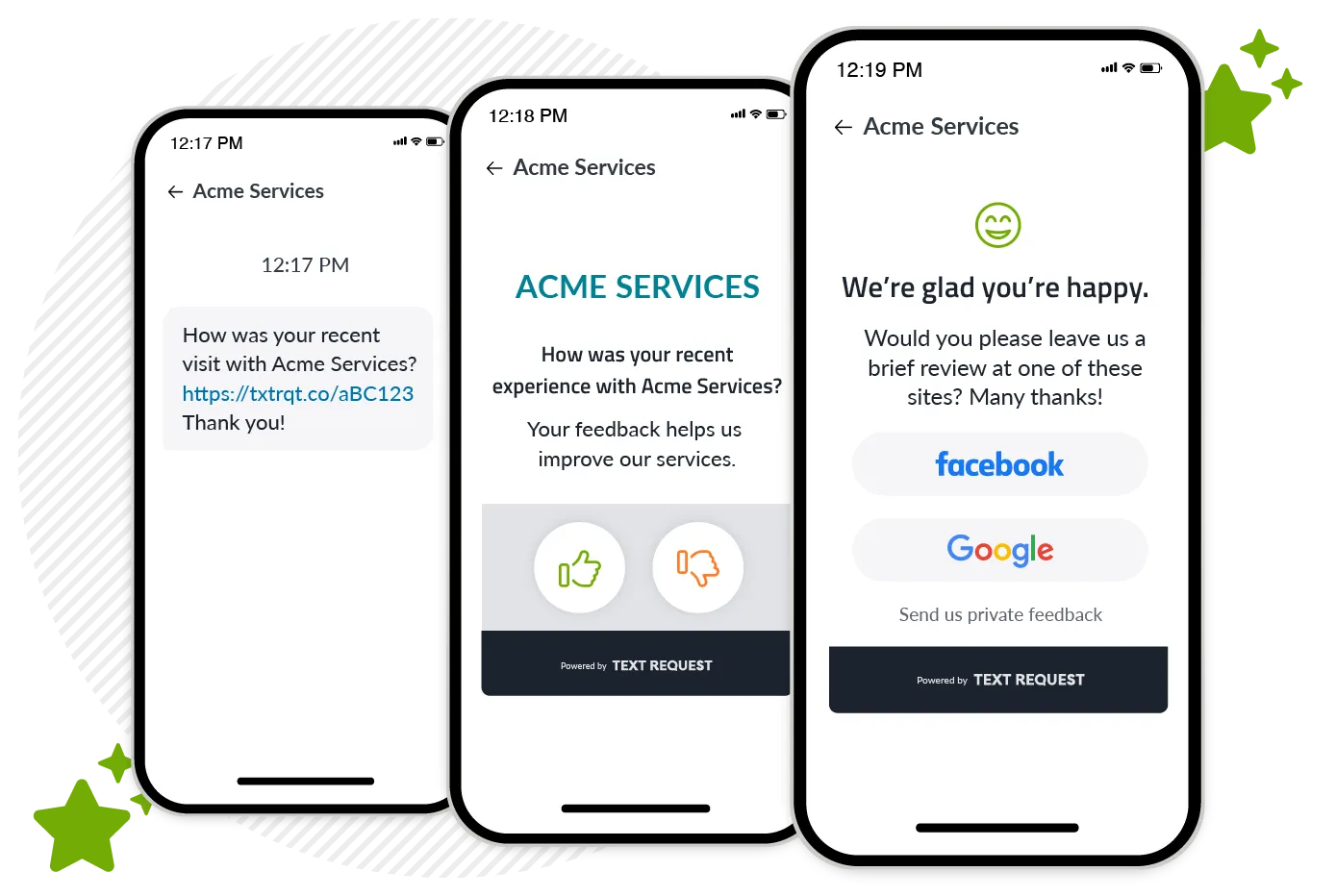
SMS makes it easy to request reviews at the right moment. This is how it works with Text Request’s review management tool:
Connect your Google Business and Facebook page to Text Request
Insert custom reviews links into your texts asking for reviews
Monitor and respond to oncoming reviews from inside Text Request
Create unique review links for different situations—like one for business clients and one for employees you placed
This helps your brand stand out to the people searching for your services—and that's huge. Text messaging is the fastest way to reach your contact list for those reviews, and Text Request gives you one place to manage them.
4. Capture new leads and candidates after hours with autoresponses.
People typically search for opportunities when they're not at work, which usually means they're reaching out to you in the evenings and weekends. You want those texts to go to a business line, instead of your recruiters’ or HR team’s personal cells, for both work-life balance and record-keeping reasons.
Use Text Request’s Autoresponder to:
Confirm you’ve received a candidate’s message
Set expectations for a follow-up
Keep candidates engaged
Autoresponses are a great way to send responses after hours, while keeping business and personal communications separate. It’s an automatic reply to all inbound messages during a custom time period that lets people know you’ve received their message and you’ll get back to them shortly.
This keeps job candidates hooked with immediate responses, so you avoid losing potential hires simply because you didn’t respond fast enough.

5. Make your business number textable.
People want to text you, and there's a chance they're already trying to text your business line.
You already advertise your phone number everywhere. Making it textable allows candidates to:
Call or text the same number
Reach your team instantly
Avoid confusion between personal and business lines
The key thing is to keep all communication in one place so your team stays organized and compliant, without relying on personal phones.
7 Ways to Streamline Your Hiring Process with SMS
1. Reach all applicants instantly with mass texts.
Instead of individually calling candidates, you can text them information about a job instead. Mass texts give you the power to reach every job candidate in your database instantly.
Mass texting allows staffing agencies to:
Share job openings instantly
Reach every qualified candidate at once
Fill roles faster
This way you don’t miss anyone, and if the candidates are interested, they can give you a call back. This process is significantly faster than phoning each candidate individually.
Text Request gives you the power to track link open rates across mass texts, so you can see if applicants are engaging with the opportunities you share.

2. Get real-time notifications from candidates.
Speed matters in recruiting. Texting allows you to see candidate responses as they come in, whether you’re at your desk or on the go. This allows your teams to:
Respond faster than competitors
Answer questions immediately
Keep candidates engaged throughout the process
The faster you reply, the more likely you are to secure the placement. This ensures your team consistently locks in quality candidates, no matter where they’re doing work.
3. Reduce no-shows with interview reminders.
Missed interviews slow down your hiring process and cost you placements. Help your job candidates be as prepared as possible for interviews and other important conversations by texting them reminders and quick tips.
Text Request’s Scheduled Messages allow you to:
Send reminders a day before and the day of
Include important details like time, location, or links
Reduce last-minute drop-offs
Simple text reminders can make a big difference when it comes to keeping your pipeline moving.
4. Personalize outreach with merge fields.
Candidates are more likely to respond when messages feel relevant and personal. The key is to consistently document personal details about job candidates, so you can then easily refer back to and insert them into new merge fields.
Merge fields can personalize your text messages with things like:
First names
Previously established pain points
Desired roles
Previously mentioned experience
And more
Personalized texts boost client satisfaction while simultaneously encouraging them to take action when you reach out—without extra manual work.

5. Save time with reusable text message templates.
Recruiters spend a lot of time answering the same questions again and again. So why not create templates your business can re-use? That'll save you time and headaches.
Premade text templates allow you to:
Respond faster
Keep messaging consistent
Reduce repetitive work
We have a pre-made list of hiring and staffing text message templates to help you get started!

6. Segment job candidates by their qualifications or industry for more targeted outreach.
Organized data is powerful data. Split contacts into whatever categories make sense for your business so you can quickly and easily reach the right people later.
Text Request’s Groups feature allows you to segment your contact list of candidates by
Industry or job type
Experience level
Location
Availability
Having contacts ready to go in these Groups makes it easier to send mass texts for job openings later.
7. Share helpful onboarding files with MMS.
Once a candidate is placed, speed still matters. Text messaging allows you to send important onboarding documents directly to new hires, including:
Tax forms
Benefits package
Employee handbook
And more
Texting onboarding materials as PDFs will preemptively answer any questions new hires have. If you’re an agency, you could also send PDFs of contracts or resumes to your business clients.
This helps candidates complete onboarding faster and reduces back-and-forth delays.
Implement Text Messaging Into Your Hiring Process
Staffing moves faster, and the agencies that respond first win. Text messaging gives your team the ability to reach candidates instantly, reduce delays, and keep your hiring process moving. Text Request allows you to harness the power of business texting to:
Manage all candidate conversations in one place
Respond faster and never miss an opportunity
Automate follow-ups, reminders, and outreach
Keep recruiter communication organized, compliant, and all in one place
Text Request not only makes your current phone number textable, we also provide ongoing training and support for your recruiters or HR team who use it to text message. Our team of experts is here to help you get started and provide the best text messaging experience possible to help you lock in more quality candidates.